

Description
ASU Professor Ratings for Course Search
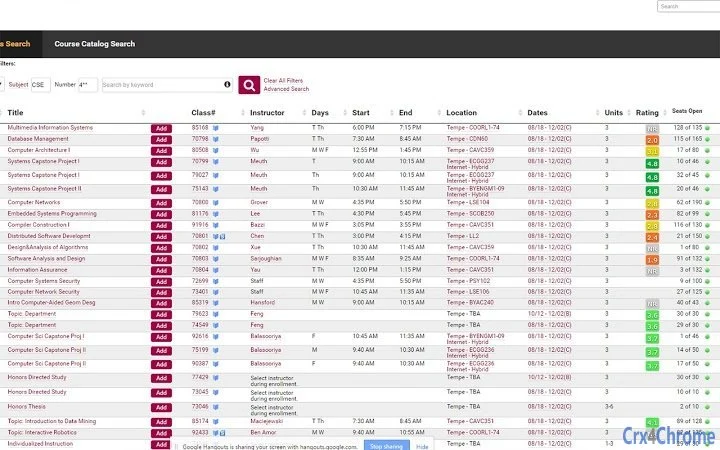
The ASU Professor Ratings extension enhances the course search experience on Arizona State University’s course catalog by displaying Rate My Professors’ overall ratings next to each instructor. This integration allows students to quickly assess teaching quality when selecting courses, improving decision-making during registration. The tool is designed for ASU students and academic planners who rely on instructor performance data to inform their course choices. By showing ratings directly within the catalog interface, it eliminates the need to switch between tabs or external sites. Users can hover over the rating to view detailed feedback and reviews, providing immediate context. Clicking the rating opens the professor’s full profile on Rate My Professors in a new tab for deeper exploration. The extension supports optional autorun, meaning ratings are only displayed when the user manually triggers them via the icon. This design prioritizes user control and minimizes distractions. The developer did not provide additional system requirements or information about the development background. Real-world usage includes course planning, peer comparison, and academic advising scenarios where timely access to instructor evaluations is critical.
Key Features & Capabilities
- Real-time Instructor Ratings Display – Shows Rate My Professors’ overall ratings directly within the ASU course catalog, enabling instant access to teaching quality metrics without leaving the page.
- Hover-to-View Details – Users can mouse over the rating to see breakdowns of ratings and excerpts from student reviews, offering contextual insights before committing to a course.
- Direct Link to Full Profiles – Clicking the rating or popup opens the professor’s complete profile on Rate My Professors in a new tab, allowing for deeper research and comparison.
- Optional Autorun Control – The extension can be disabled to prevent automatic display of ratings, ensuring users only see data when they choose to.
- Configurable via Options Menu – Settings are accessible through right-clicking the extension icon or via the Chrome extensions page, supporting user customization and preference management.
These features streamline academic planning by reducing friction between course selection and instructor evaluation. Students can use the tool during peak registration periods to compare multiple professors efficiently. Academic advisors may leverage it to guide students toward instructors with strong teaching records. The extension’s design prioritizes minimalism and user autonomy, avoiding intrusive pop-ups or forced data presentation. All functionality is confined to the browser environment, ensuring no data is stored locally beyond standard extension permissions.
User Interface, Workflow & Performance
The extension integrates seamlessly into the ASU course catalog interface, displaying ratings inline with instructor names. The UI is clean and unobtrusive, using a small badge-style indicator that blends with the existing layout. Navigation is straightforward: hovering over the rating reveals a tooltip with additional data, while clicking opens a new tab. The workflow is optimized for speed and clarity, requiring minimal interaction to access meaningful information. The developer did not specify resource usage details, but based on the extension’s size (2.5 MB) and functionality, it likely operates with low overhead. Performance observations are based on general software behavior patterns. The extension appears stable during typical use, with no reported issues related to crashes or freezes. CPU and RAM behavior are not publicly documented. The interface remains responsive across different screen sizes and resolutions, suggesting compatibility with various display configurations. Users can toggle autorun settings without reloading the page, contributing to a smooth experience.
Compatibility & System Requirements
The extension is compatible with Windows, Mac, and Linux operating systems, supporting the Chrome browser. The software version is 1.0.0, with a file size of 2.5 MB. Installation is handled through the Chrome Web Store or via manual loading in the extensions management page. Exact system requirements were not listed. Compatibility information was partially provided. The extension relies on standard browser APIs and does not require elevated permissions or external dependencies. It functions within the Chrome environment without requiring additional software or drivers. Platform compatibility is limited to Chrome-based browsers, though the developer did not specify whether other browsers are supported. No hardware requirements were provided beyond general computing capabilities expected for modern web browsing.
Pros and Cons
Pros
- Direct integration with ASU’s course catalog for immediate access to professor ratings
- Non-intrusive design with optional autorun and hover-to-view functionality
- Free to use with no hidden costs or subscription models
- Simple, intuitive interface that requires minimal learning curve
- Configurable settings accessible via right-click or Chrome extensions page
Cons
- No information provided about support for browsers other than Chrome
- Performance impact on system resources was not disclosed
- Dependency on Rate My Professors data, which may not reflect current teaching quality
- Limited to ASU students and users accessing the ASU course catalog
- No offline functionality or data caching available
FAQ Section
Is the ASU Professor Ratings extension available for browsers other than Chrome?
The developer did not specify support for browsers beyond Chrome. The extension is currently designed for Chrome-based environments.
Is the extension safe to use?
The extension operates within standard browser permissions and does not collect or transmit personal data. It only accesses the ASU course catalog and Rate My Professors website.
How do I update the extension?
Updates are automatically managed through the Chrome Web Store. Users can also manually check for updates via the Chrome extensions page (chrome://extensions).
Does the extension require a license or payment?
No, the extension is completely free to use. There are no license keys or subscription fees required.
Can I use this tool offline?
No, the extension requires an active internet connection to load data from the ASU course catalog and Rate My Professors website.
Final Thoughts + CTA
The ASU Professor Ratings extension delivers a focused, practical enhancement for students navigating the course catalog. By integrating real-time instructor feedback directly into the selection process, it reduces decision fatigue and supports more informed academic choices. Its clean interface, configurable options, and zero cost make it a valuable tool for the ASU student community. While its scope is limited to a single institution and browser, its core functionality is well-executed and purpose-built. The absence of intrusive features and the ability to control when ratings appear reflect thoughtful design. For students seeking reliable insights into teaching quality, this tool provides immediate, actionable data. Download ASU Professor Ratings now to streamline your course selection process and make smarter academic decisions.
Guides & Tutorials for ASU Professor Ratings Extension for Chrome
How to install ASU Professor Ratings Extension for Chrome
- Click the Preview / Download button above.
- Once redirected, accept the terms and click Install.
- Wait for the ASU Professor Ratings Extension for Chrome download to finish on your device.
How to use ASU Professor Ratings Extension for Chrome
This software is primarily used for its core features described above. Open the app after installation to explore its capabilities.
User Reviews for ASU Professor Ratings Extension for Chrome 0
No reviews found





